Your performance, intact
Add ambience behind the recorded attack, timing and identity.
Drum ambience
Give a close recording the space, weight and attitude of a drum room. Wake listens for kick, snare and tom strikes, then builds stereo ambience behind the performance.
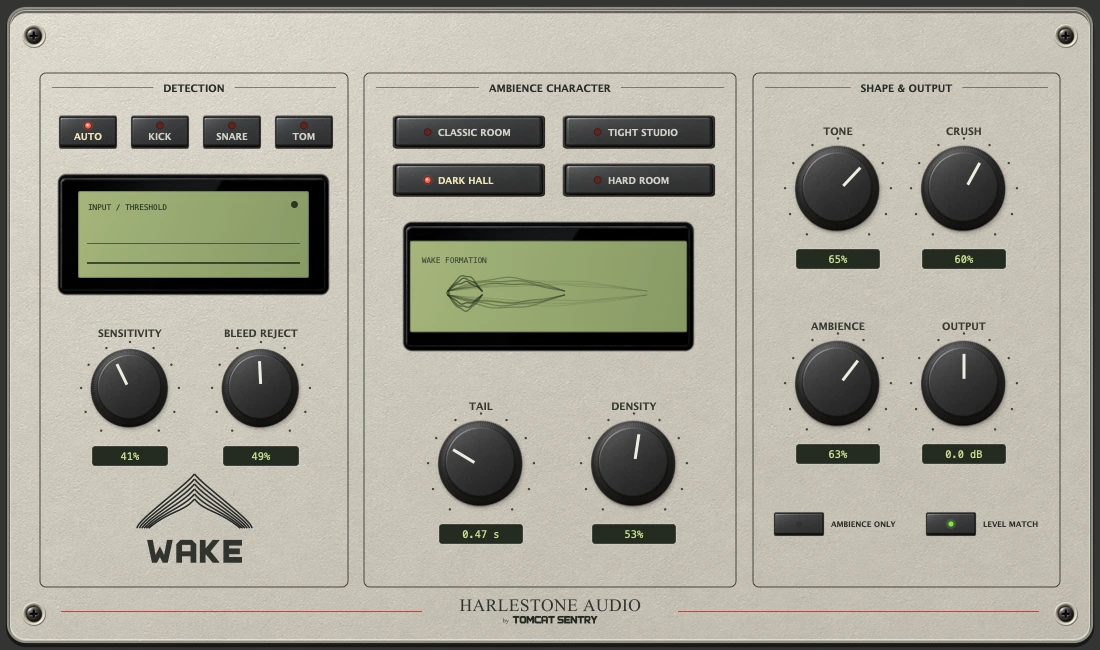
Add ambience behind the recorded attack, timing and identity.
Classic Room, Tight Studio, Dark Hall and Hard Room offer different starting points.
Set the tail and density, then add tone and crush. Audition the ambience on its own.
THE SOUND WE’RE CHASING
Think of the punch and controlled ambience of ’90s alternative-rock drums: a kick with weight, a snare that opens into the room, and a performance that holds its own against dense guitars. Wake’s objective is to bring that sense of scale to close-recorded drums without losing the attack that makes them feel alive.
The biggest records of the 90's used samples to drive reverbs and shape their tone to control where the ambience sits. Wake takes a different route: the detected attack from your recording becomes the source for its own room engine.
INSIDE THE ENGINE
Transient detection identifies candidate hits. Auto classifies kick, snare and tom attacks; dedicated modes let you guide the engine when working on a single drum. Sensitivity and Bleed Reject control which events are accepted.
A short captured attack excites the room. Drum-specific filtering shapes that source before diffusion, keeping the ambience connected to the recorded hit rather than triggering a fixed library sample.
Four all-pass diffusion stages feed an eight-line feedback delay network. Reflections circulate and combine into a stereo tail. Density changes diffusion; Tone shapes high-frequency damping; Crush adds optional saturation to the room output.
The current engine reports approximately 31 ms of processing latency to the host. This gives detection and room formation time before the delayed dry attack; it is not an adjustable pre-delay control.
GET TO KNOW THE CONTROLS
A PRACTICAL STARTING POINT
Try Wake on a close snare or kick track first. Select the matching detection mode and use Ambience Only to check that wanted hits excite the room without excessive spill.
Begin with Classic Room and a short-to-medium Tail. Listen against the next hit: the room should support the rhythm rather than blur it. Explore Tight Studio when the part needs more restraint.
Return to the combined signal and raise Ambience gradually. Use Tone to place the room behind the attack, then add Crush if you want more colour. Compare with Level Match and listen in the full mix.
Automate Ambience for a larger chorus or a more contained verse. The aim is a stronger performance in the song—not a guaranteed match to one engineer’s records.
TAKE A LISTEN
A development comparison of the dry performance and Wake’s room engine.
Development listening examples. Final host and musical release approval remain open.
Requires an Audio Unit-compatible DAW or host on macOS.
Wake 0.2.6 · macOS Audio Unit